How to Export Receive Money in Xero
Handling Receive Money transactions in Xero is vital for ensuring your bank and income records are correct. However, the options for exporting these transactions in Xero are limited. Whether you are reconciling income, checking receipts, or making reports for clients, manually exporting each entry can take time and lead to mistakes.
Xero's built-in export tool is effective for small-scale applications. However, as you begin managing larger datasets or require advanced filtering, it can become restrictive. Here's the reason:
No Bulk Exporting: Xero does not allow bulk exporting of Receive Money transactions; users must rely on restricted report formats or export individual bank statements one at a time.
No Bulk Editing: Once exported, any needed updates or fixes should be done manually in Excel and then re-imported; this process is both repetitive and prone to errors.
Limited File Formats: Xero only exports Receive Money data in CSV format, which might not work with every accounting system or reporting template. There is very little column customisation available.
Manual Reconciliation Challenges: Xero offers limited context for reconciliation when exporting Receive Money. You may need to manually verify fields like payment references, notes, and linked contacts.
No Undo/Rollback Option: Once data is exported or processed externally, Xero does not have a rollback or undo function, requiring users to redo the entire export if any errors arise.
These limitations create challenges for accounting firms, bookkeepers, and SMBs in their efforts to manage and receive money efficiently. This is where SaasAnt Transactions for Xero comes in. With features such as bulk exporting, customizable filters, undo capabilities, and support for different file formats, it changes a time-consuming task into an easy, automated workflow.
This blog is suitable for accountants, bookkeepers, and small- to medium-sized business owners who use Xero and want quicker, more accurate methods to export bulk receive money transactions effectively.
What Is Receive Money in Xero?
In Xero, Receive Money refers to transactions in which your business receives funds that are not directly associated with customer invoices, such as bank deposits, asset sales, refunds, or interest income. These entries are recorded in your bank accounts to keep income reporting and reconciliations accurate. Exporting them is helpful for audits, financial reviews, and custom reports.
Accounting Firm Managing Client Payment Exports
A medium-sized accounting firm handles several clients who get daily payments, such as deposits, refunds, and other income logged under Receive Money in Xero. Exporting each transaction manually for reporting or reconciliation was tedious and error-prone. With SaasAnt Transactions for Xero, the firm can bulk-export all Receive Money records with custom fields, filter by date, client, or account, and create audit-ready reports in just seconds. This simplifies financial reporting, ensures data accuracy, and enables accountants to focus on analysis rather than repetitive manual exports.
Contents
What Is Receive Money in Xero?
Accounting Firm Managing Client Payment Exports
How to Export Receive Money from Xero
Why Choose SaasAnt Transactions for Xero?
Wrap Up
Frequently Asked Questions
How to Export Receive Money from Xero
Always back up your Xero Online data before you begin. Even though SaasAnt is designed to be safe and reliable, a backup provides an added layer of security. Follow the steps below to get started.
Step 1: Log In to Your Xero Account
Log in to your Xero account.
Step 2: Navigate to the Apps Menu
On the right side of the Xero dashboard, you can see the menu bar with various options.
Select the “Waffle” icon. Click the dropdown and select “Find more apps on Xero App Store.”
Step 3: Search SaasAnt Transactions
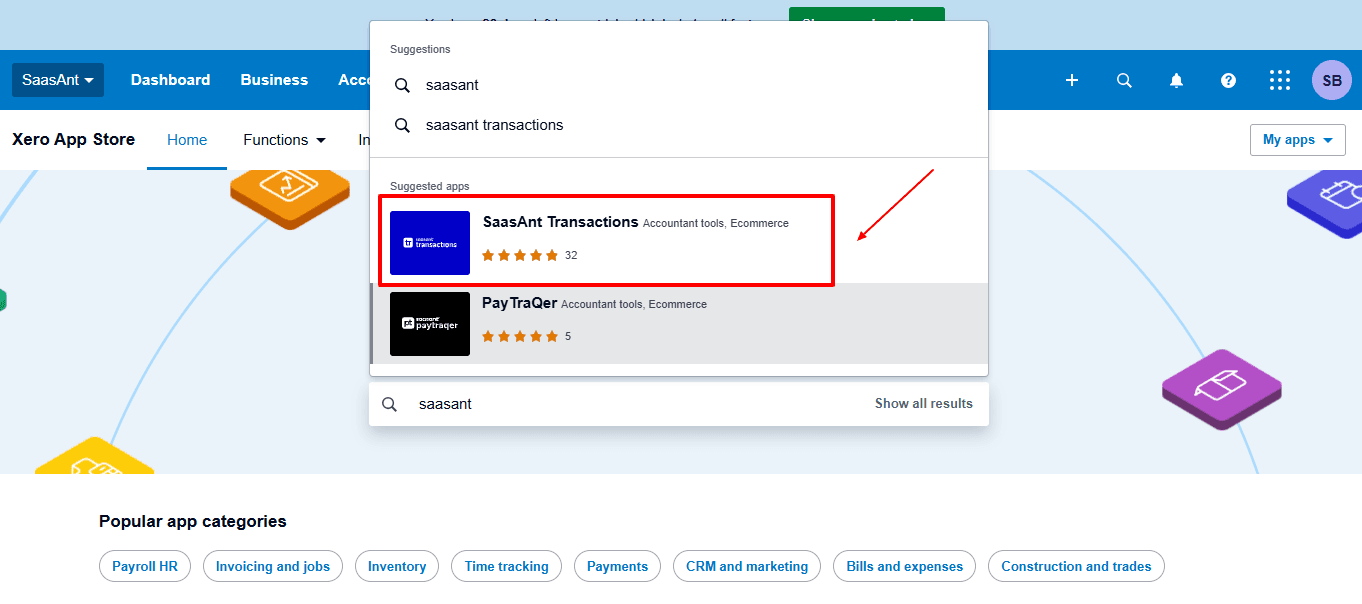
In the search bar, type “SaasAnt Transactions” as shown by the arrow in the image below.
Step 4: Open SaasAnt Transactions
Get the app from the App Store and connect it to Xero.
On the SaasAnt dashboard:
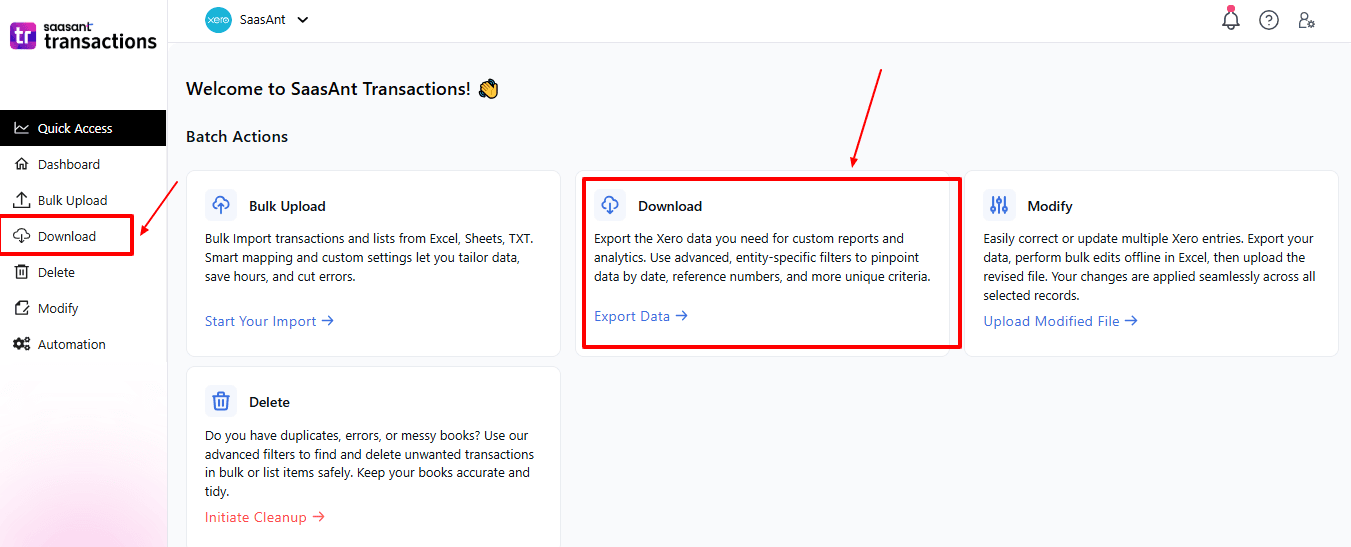
On the left side of the SaasAnt Transactions dashboard, you can see the menu bar with various options.
Select "Download”
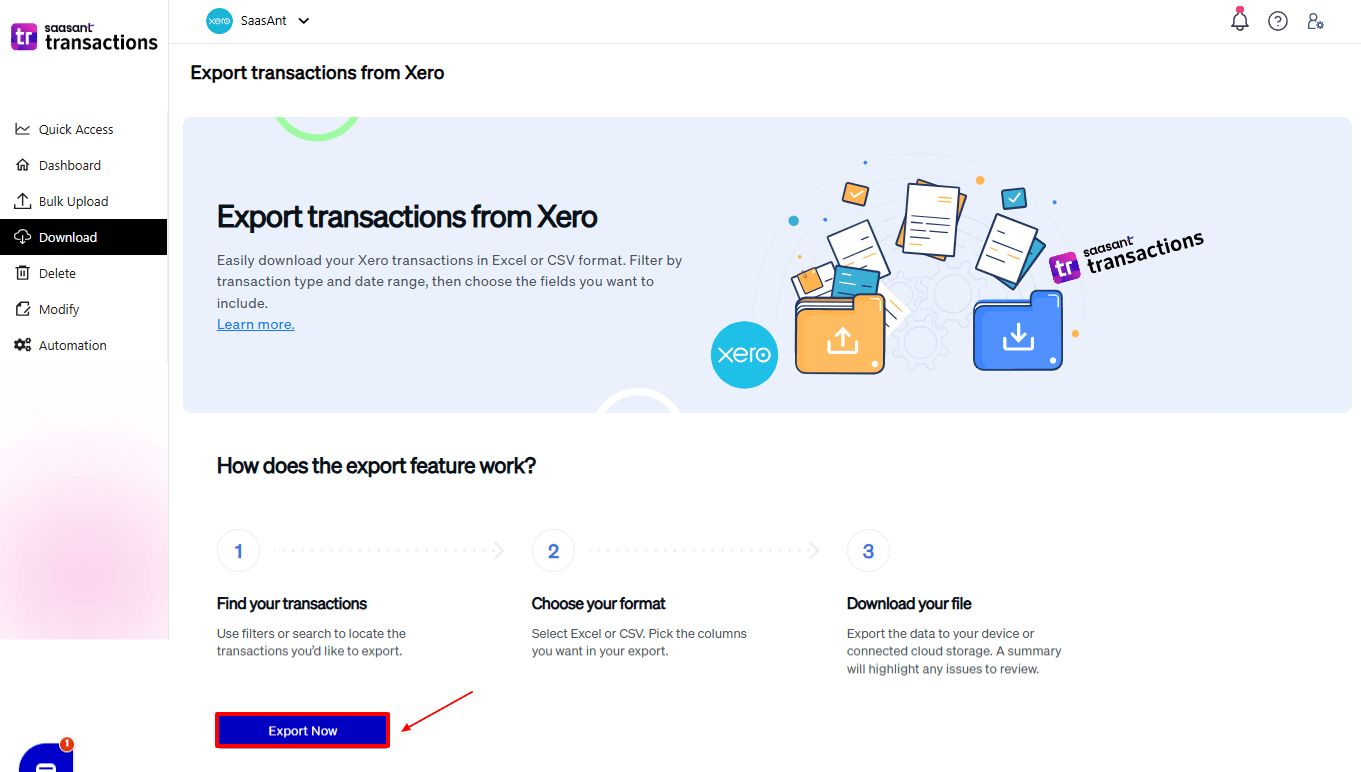
The Dashboard appears as shown in the image below.
Step 5: Search and Filter Data
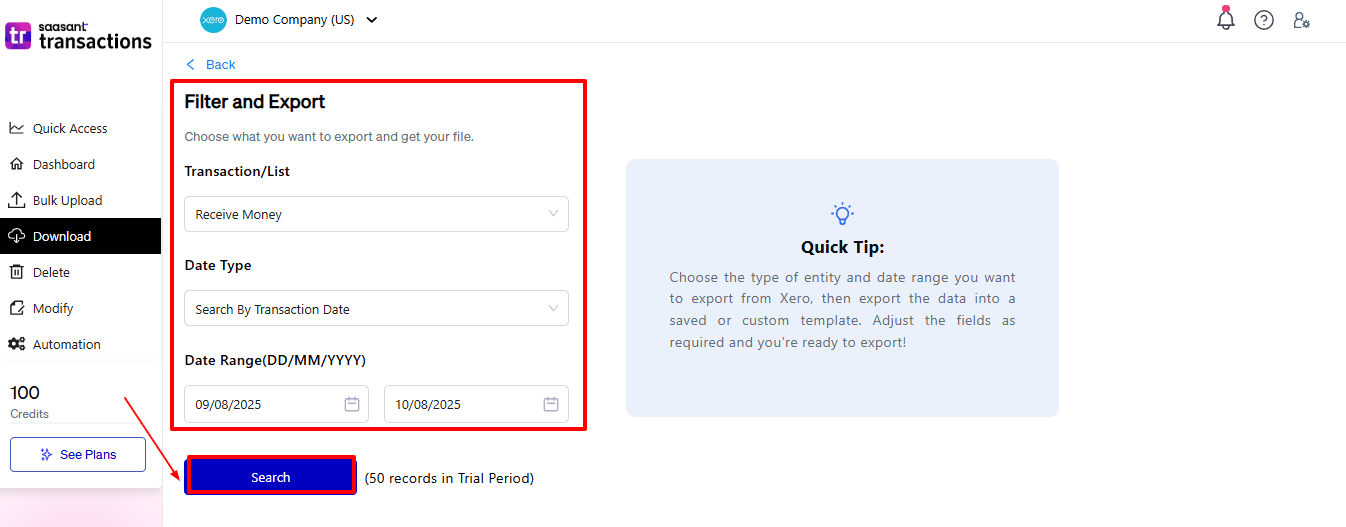
Fill in the required fields, such as transaction type, date type, and date range. We can select the transaction type as “Receive Money”.
Step 6: Download Data
Click “Search,” and the Receive Money appears in the dashboard. Now select “Download”.
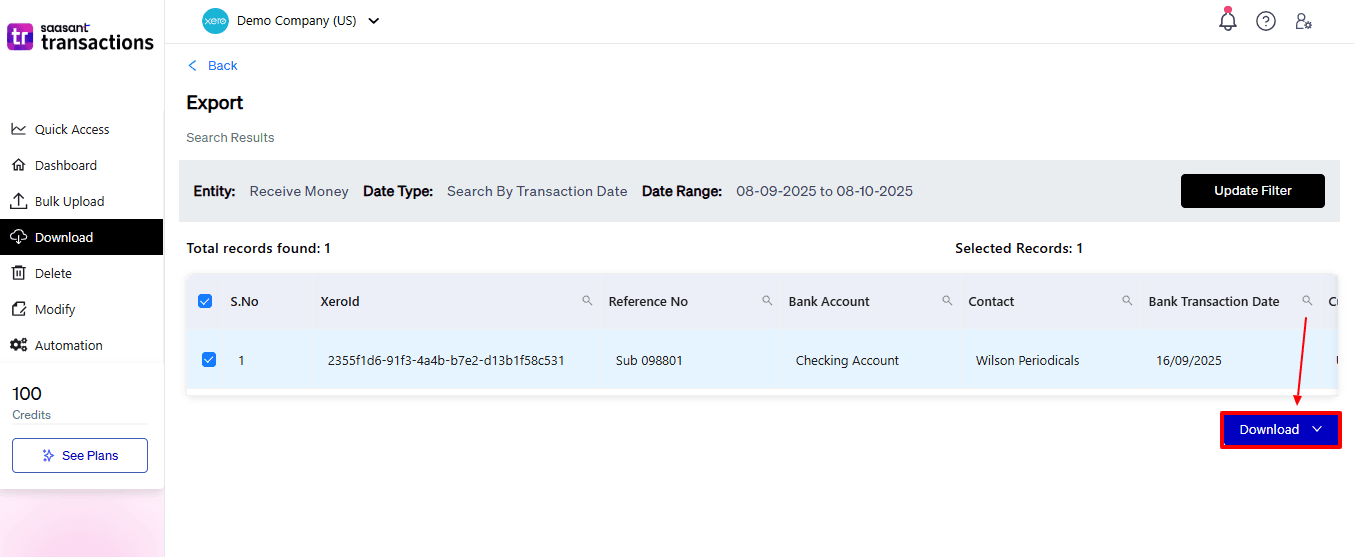
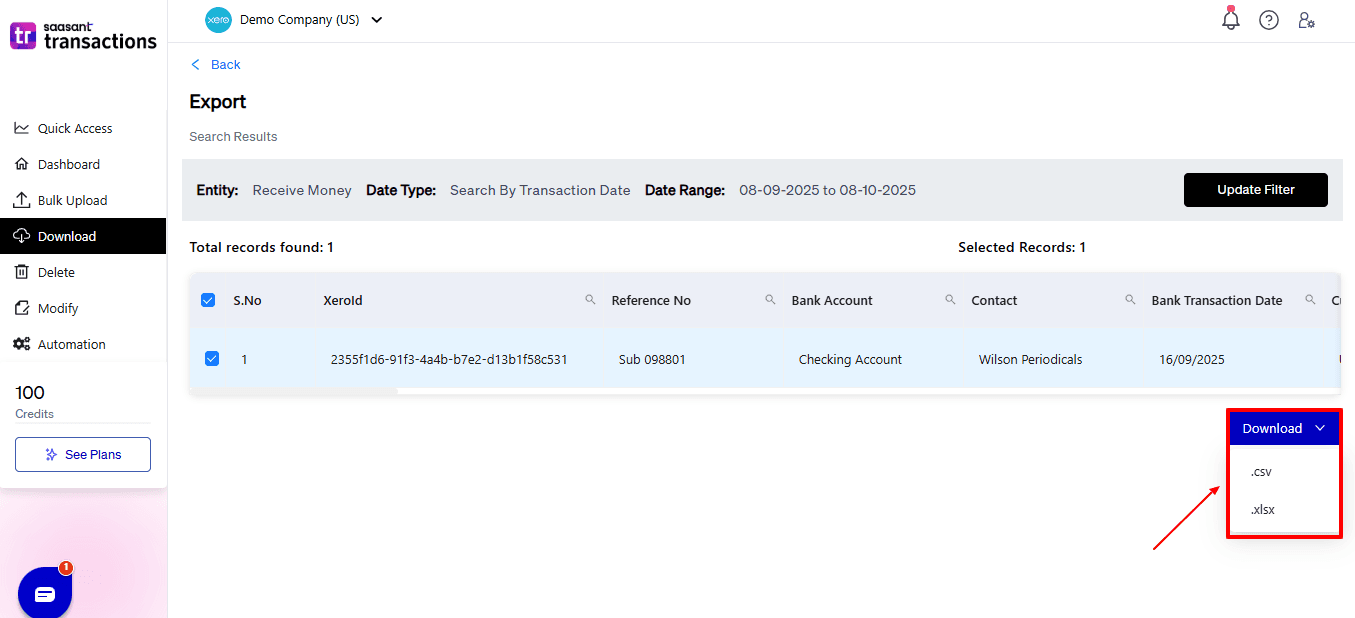
After you choose ‘Download,’ a dropdown will appear with two file format options: CSV and XLSX. Select your preferred format and download your Receive Money data.
Why Choose SaasAnt Transactions for Xero?
Exporting Receive Money transactions in Xero can be a hassle, particularly when dealing with many transactions or several accounts. SaasAnt solves these issues with enhanced features tailored for accountants, bookkeepers, and small business owners:
Bulk Export: Export bulk receive money transactions from Xero all at once, which saves hours of manual work and boosts efficiency.
Adaptable File Support: SaasAnt allows you to export in Excel, CSV, and IIF formats, giving you options for different accounting and reporting requirements.
Custom Field Mapping: Select the specific fields to include: transaction date, amount, reference, contact, tax code, or bank account, for accurate, report-ready information.
One-Click Undo: Instantly roll back any export task if issues arise, ensuring data correctness and preventing the possibility of unintended mismatches.
Automation & Templates: Plan regular exports and save personalised templates for ongoing tasks, which helps to simplify monthly or quarterly financial activities without the hassle of manual repetition.
Wrap Up
Exporting Receive Money transactions is essential for ensuring transparency and accuracy in financial management. However, Xero’s built-in export options do not provide the flexibility and scalability that growing businesses need. SaasAnt Transactions for Xero fills this gap with features like bulk export, field customisation, validation, and automation.
Accountants, bookkeepers, and small business owners can efficiently handle large amounts of data while maintaining accuracy and compliance. Whether you are managing income from various sources or reconciling client accounts, SaasAnt simplifies a previously time-consuming task into a quick, accurate, and smooth process, making financial reporting more straightforward than ever.
If you have inquiries regarding our products, features, trial, or pricing, or if you require a personalised demo, contact our team today. We are ready to help you find the ideal solution for your Xero workflow.
Frequently Asked Questions
1) Can I export all Receive Money transactions in one go?
No, Xero's built-in export feature does not allow for bulk exporting. SaasAnt enables the export of hundreds or even thousands of transactions simultaneously.
2) How do I include transaction references and payment methods in exports?
With SaasAnt, you can map and export fields, including reference numbers, payment methods, and bank accounts, features that Xero lacks natively.
3) What file formats can I export to?
SaasAnt is compatible with Excel, CSV, and IIF, giving you flexibility for reporting and integration with other tools.
4) Is it possible to export historical Receive Money transactions from previous years?
Yes. SaasAnt can efficiently manage exports of both current and past transactions.
5) How does SaasAnt validate the exported data?
SaasAnt verifies for any missing or incorrect fields before export, minimising errors in reconciliation or reporting.
Read Also
How To Import Data Into Xero
How to Edit Bills in Xero
How to Bulk Edit Data in Xero
How to Edit Customer Credit Note in Xero