QuickBooks Manufacturing: How to Set It Up for Your Business
Accounting software has increasingly evolved to address the specific operational and reporting needs of different industries. For manufacturers and wholesalers, QuickBooks Desktop Enterprise provides advanced functionality designed to handle complex inventory, costing, and reporting requirements. This article, based on current Intuit guidance and best practices, explains how to set up and use QuickBooks Desktop Enterprise for manufacturing-focused businesses.
Contents
Advanced Inventory Management for Manufacturers
Integrated Payroll and Time Tracking
Industry-Specific Reporting and Insights
App Integrations and Extended Functionality
Step 1: Purchase and Install QuickBooks Desktop Enterprise
Step 2: Create Your Company File
Step 3: Set Up Inventory Items
Step 4: Configure Assembly Items
Step 5: Set Up Vendors and Customers
Step 6: Document the Manufacturing Process
Conclusion
FAQs
Advanced Inventory Management for Manufacturers
QuickBooks Desktop Enterprise includes robust inventory tools that help manufacturers manage stock more accurately and efficiently. These features support detailed inventory tracking, assembly items, and precise valuation methods, enabling businesses to maintain optimal inventory levels. Advanced inventory capabilities also help address challenges such as negative inventory, multi-location tracking, and accurate cost calculations, which are critical in manufacturing and wholesale environments.
Integrated Payroll and Time Tracking
Manufacturing businesses often face complex payroll requirements, including shift-based labor, overtime, and compliance considerations. By integrating payroll and time tracking within QuickBooks, companies can streamline wage calculations, improve accuracy, and ensure compliance with applicable labor regulations. This integration reduces administrative workload and supports more efficient workforce management.
Industry-Specific Reporting and Insights
QuickBooks Desktop Enterprise offers reporting tools tailored to manufacturing operations. These include reports focused on production costs, inventory valuation, profitability by product or assembly, and overall financial performance. Access to detailed, industry-relevant reports enables manufacturers to make informed decisions based on accurate cost and margin analysis.
App Integrations and Extended Functionality
Through the QuickBooks App ecosystem, manufacturers can extend the core functionality of QuickBooks Desktop Enterprise by integrating with third-party applications for inventory planning, demand forecasting, shipping, and other operational needs. These integrations help create a connected system that supports end-to-end manufacturing workflows.
By following a structured setup process and leveraging QuickBooks Desktop Enterprise's advanced features, manufacturing and wholesale businesses can improve inventory control, enhance financial visibility, and streamline day-to-day operations.
Step 1: Purchase and Install QuickBooks Desktop Enterprise
Start acquiring QuickBooks Desktop Enterprise for Manufacturing and Wholesale from the official QuickBooks website. Follow the prompts to download and install the software on your computer.
Step 2: Create Your Company File
Open QuickBooks and set up a new company file by navigating to 'File' > 'New Company.'
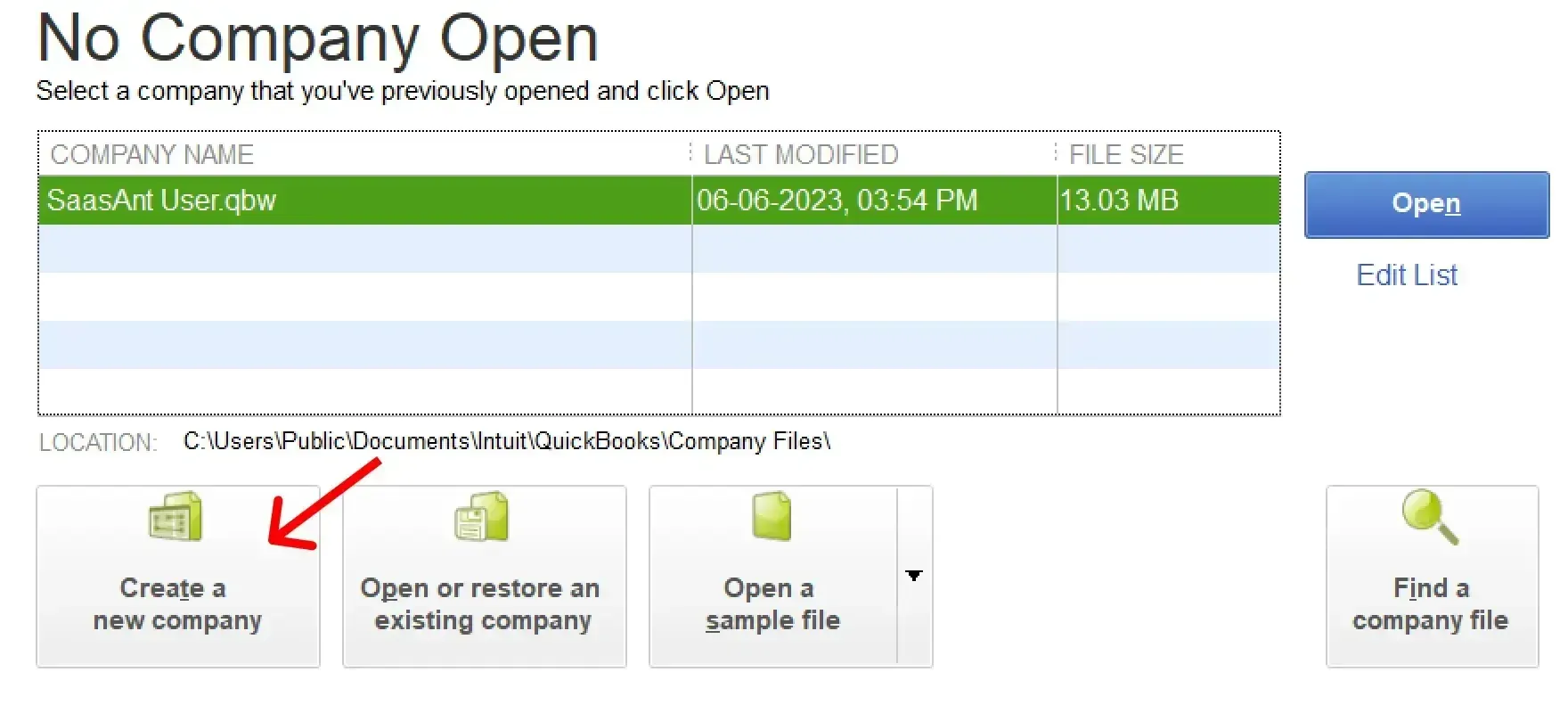
Provide your company details as prompted and select the 'Manufacturing and Wholesale' industry.
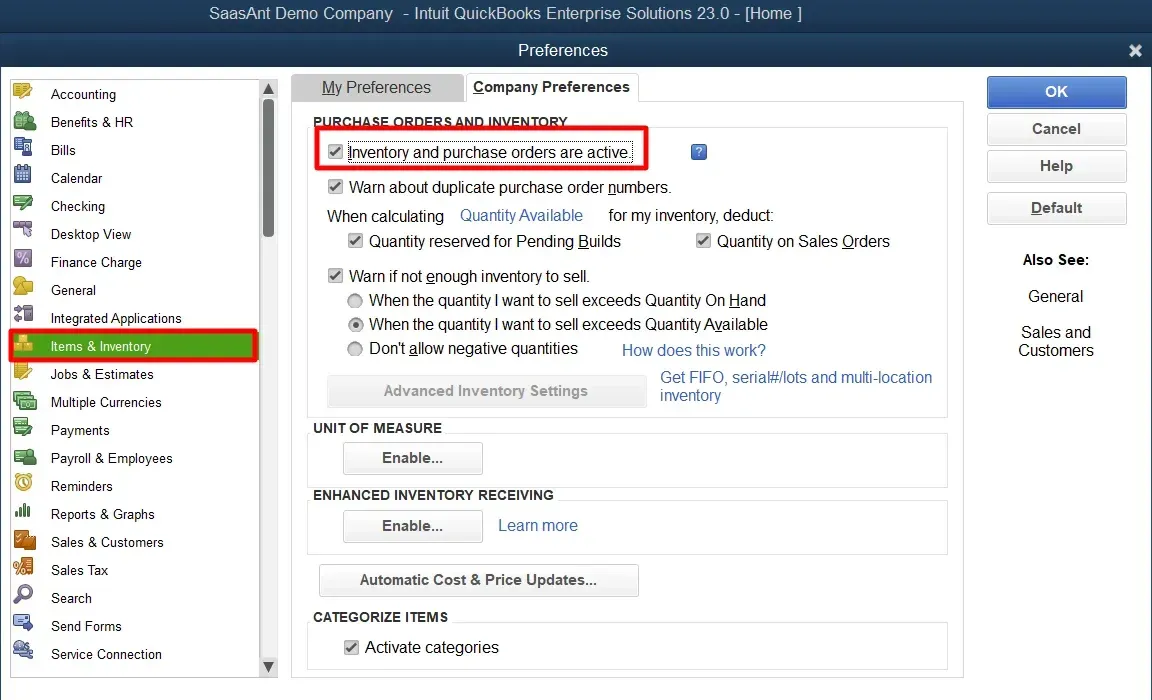
After creating the company file, you must enable inventory tracking through Edit -> Preferences > Items & Inventory > Company Preferences > Enable ‘Inventory and purchase orders are active.’
Step 3: Set Up Inventory Items
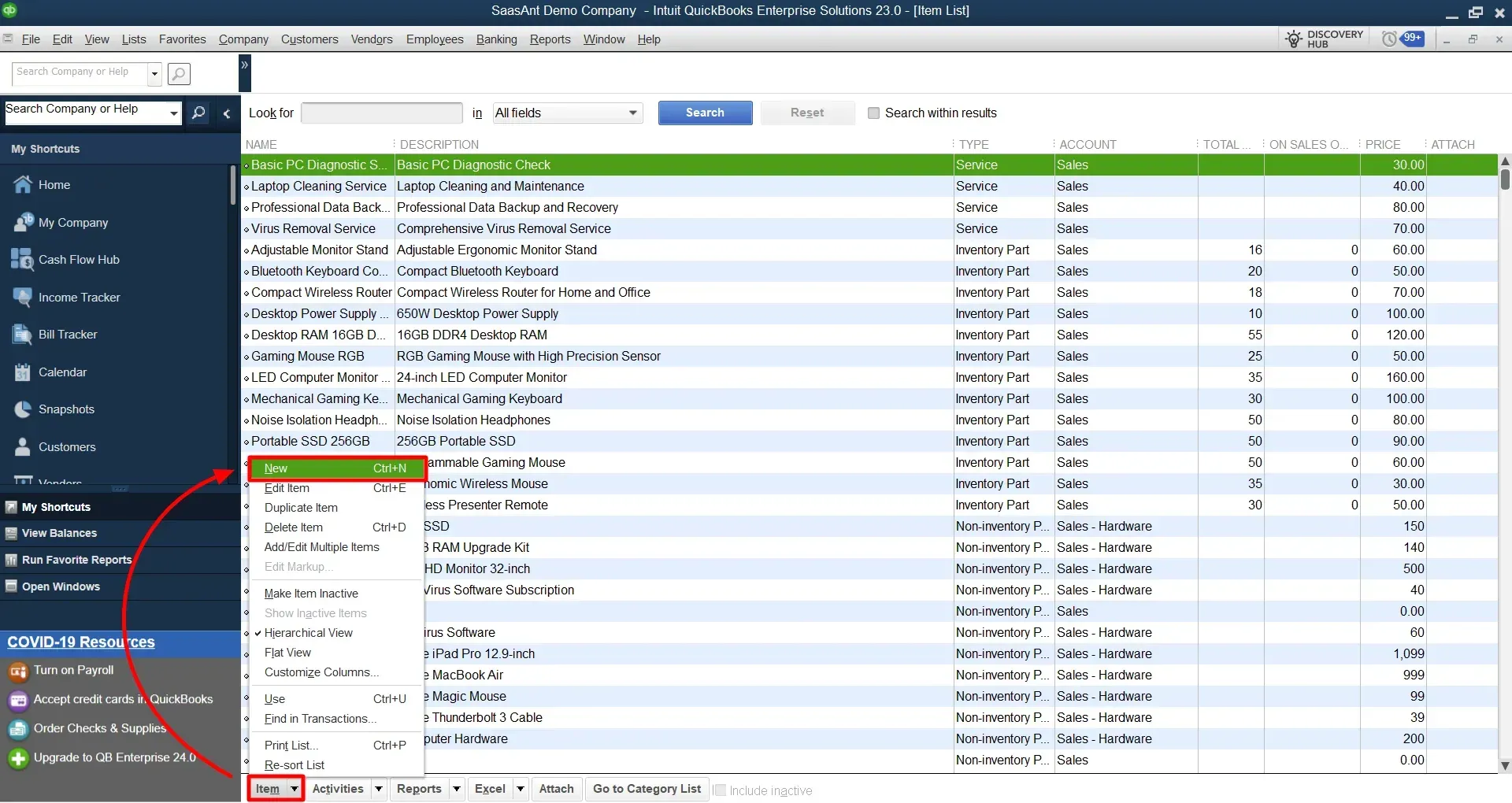
Go to the "Lists" menu and select "Item List."
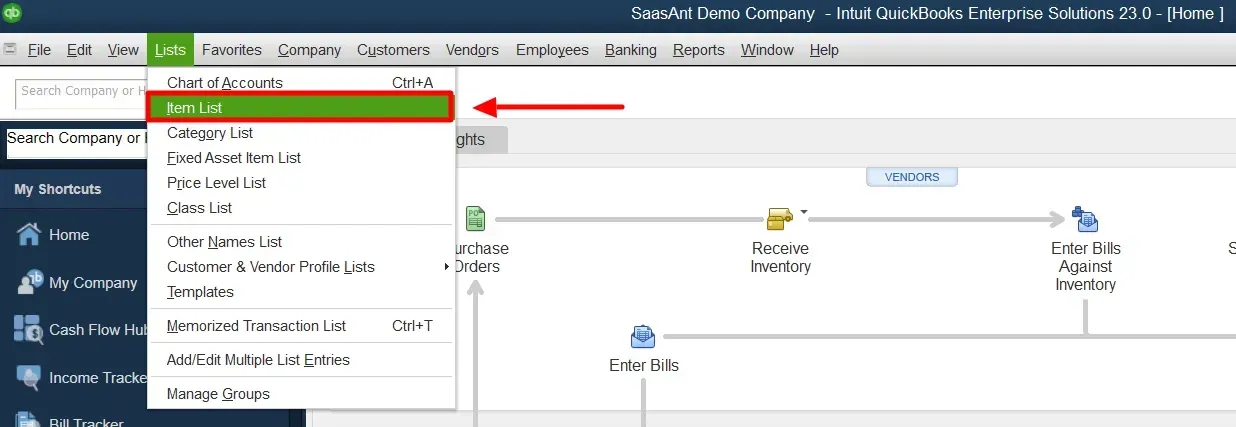
Click on "Item" and choose "New."
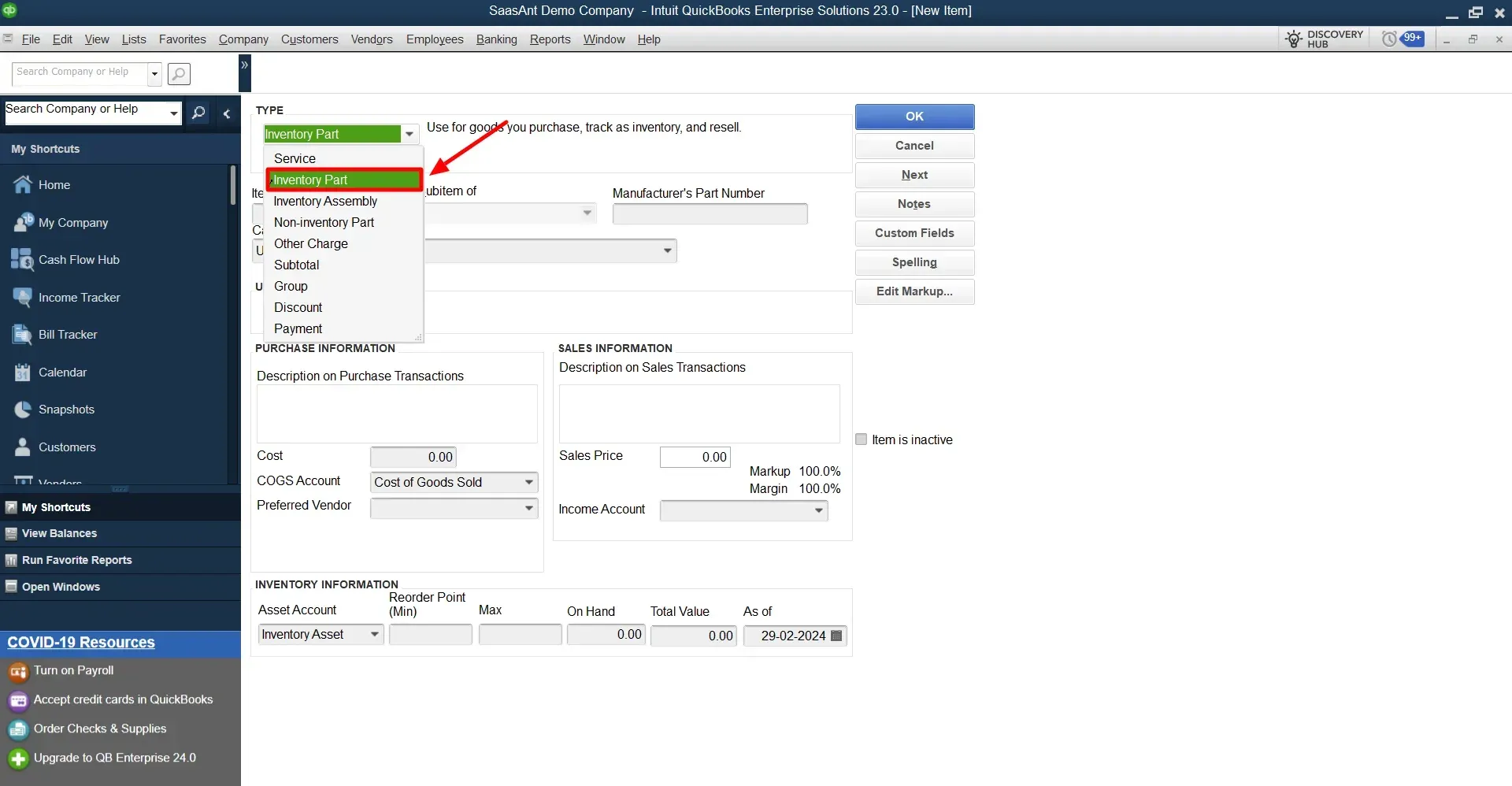
Select "Inventory Part" as the type of item.
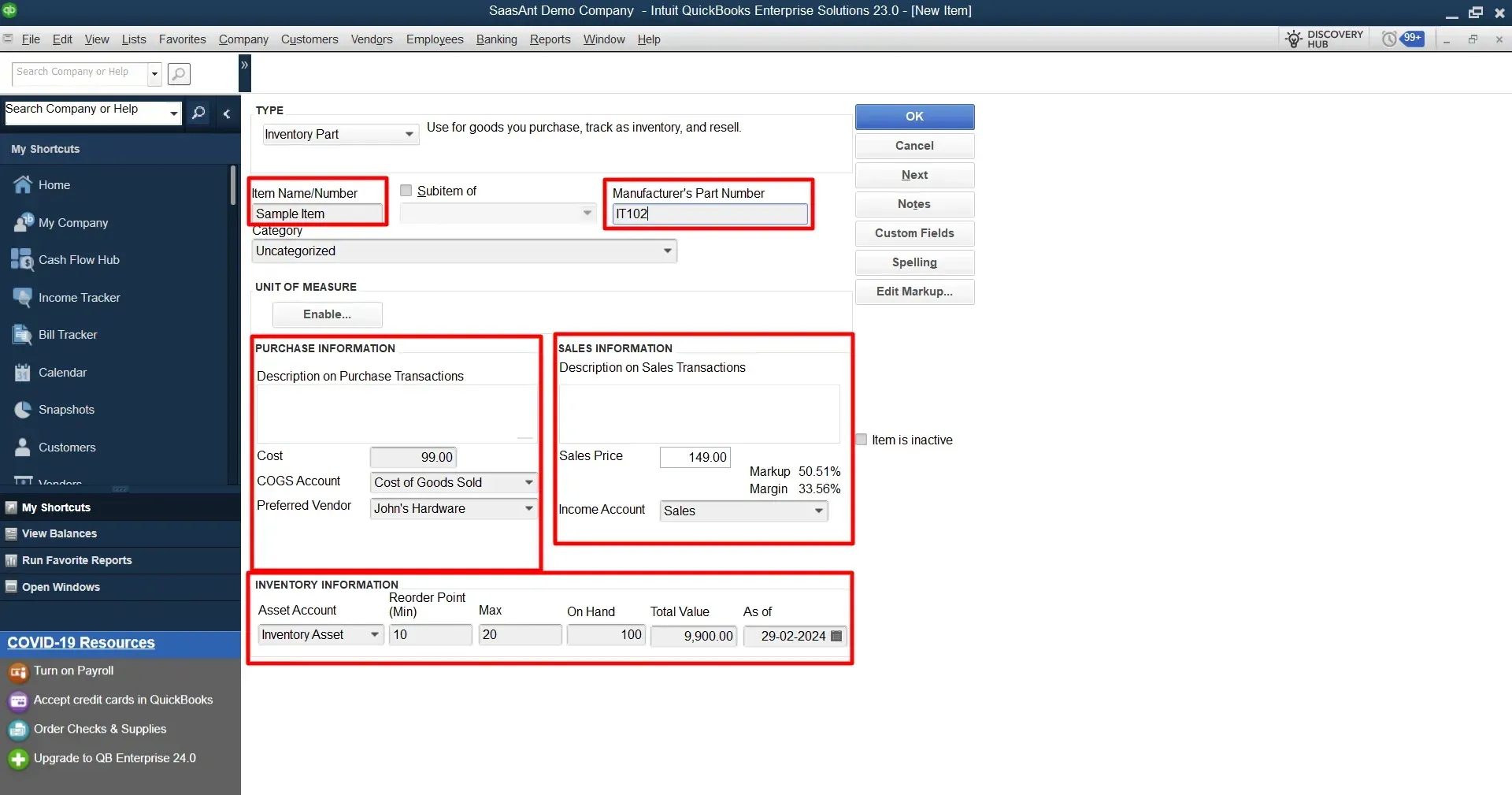
Fill in the details for the inventory item, such as the item name, description, sales price, cost, and other relevant information.
Save the item.
Step 4: Configure Assembly Items
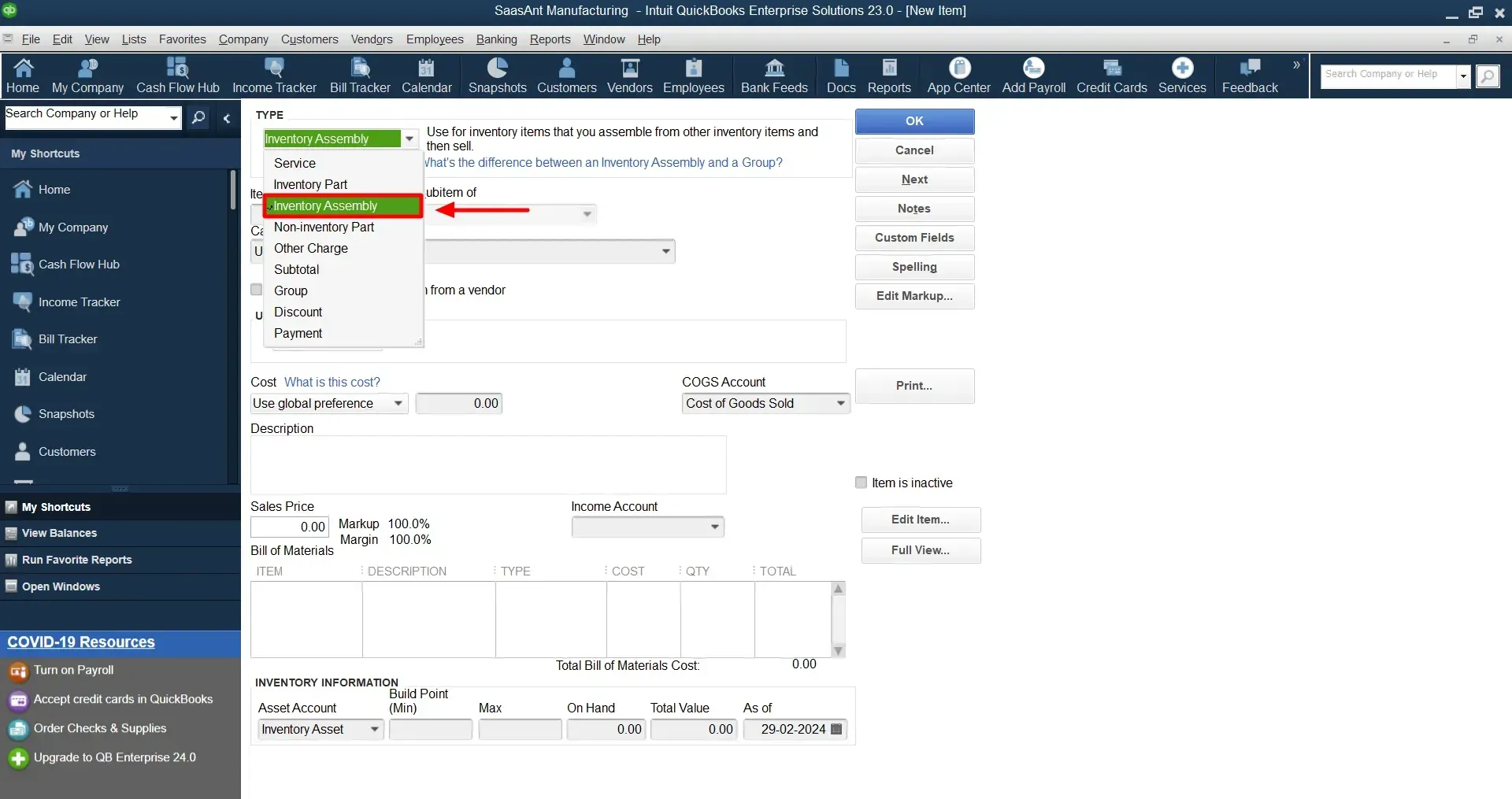
In the "Item List," click on "Item" and select "New."
Choose "Inventory Assembly" as the item type.
Enter a name for the assembly item and provide a description.
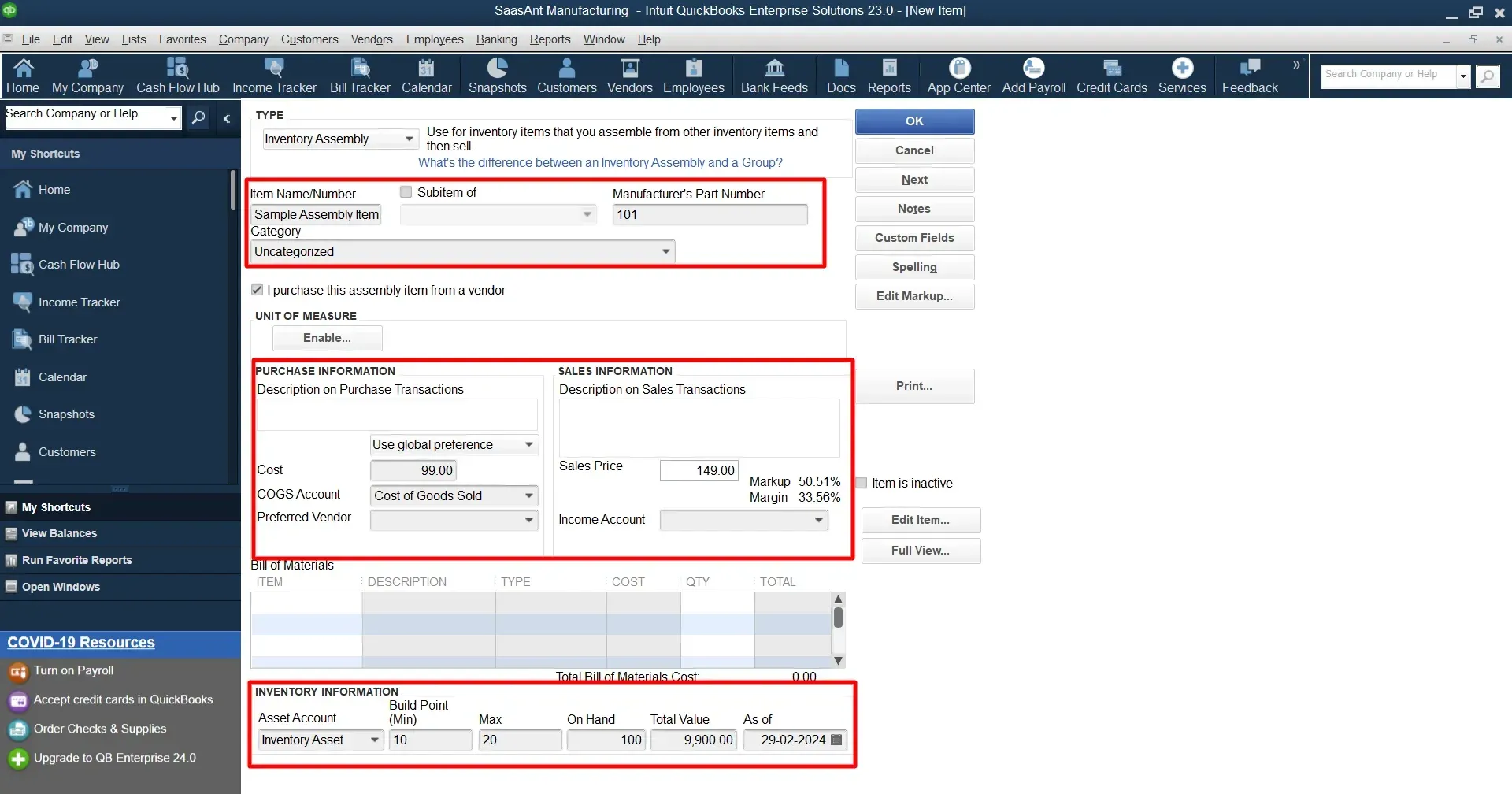
Save the assembly item.
Step 5: Set Up Vendors and Customers
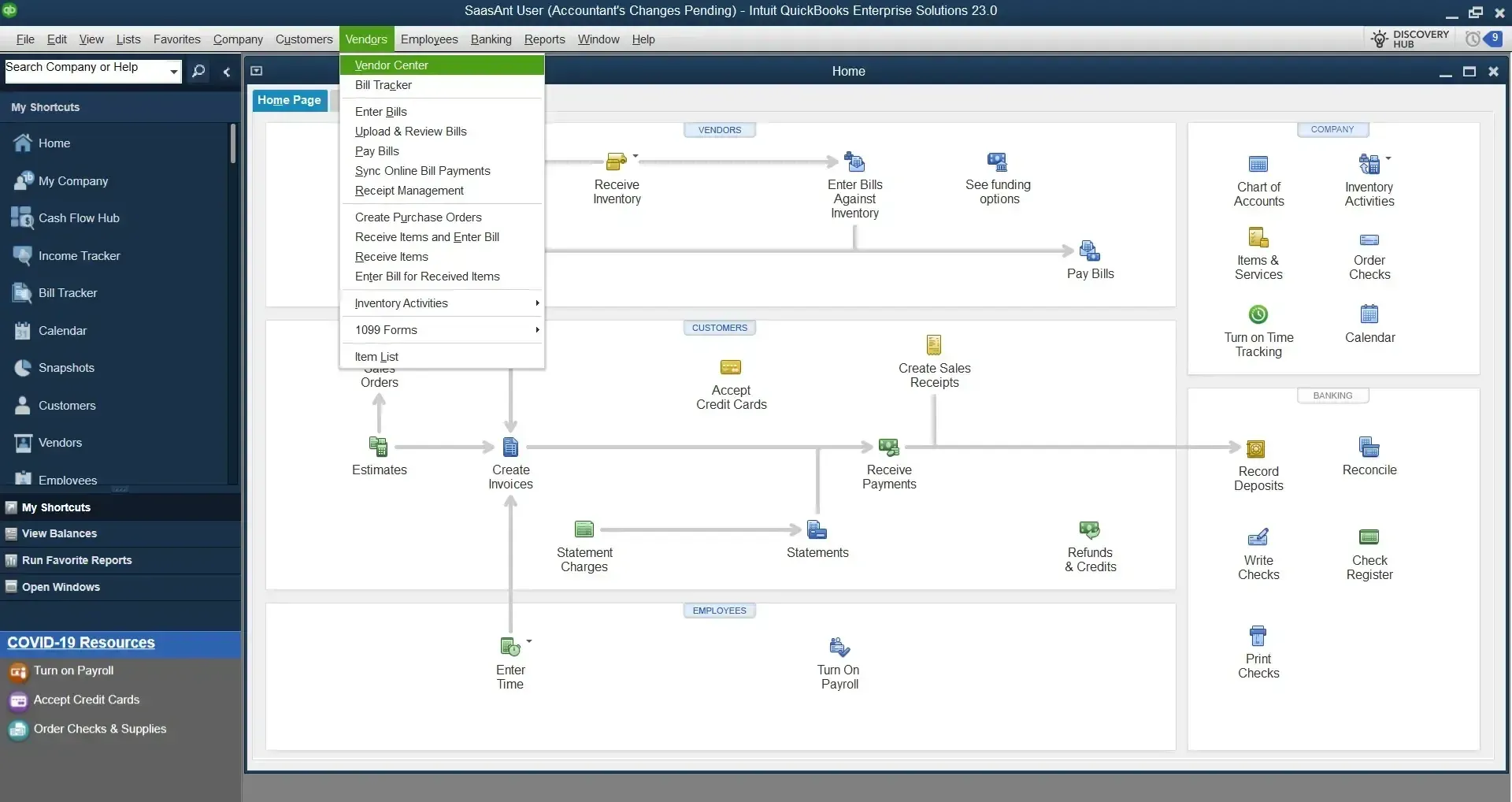
Under 'Vendors' > 'Vendor Center,' set up vendors for raw materials procurement.
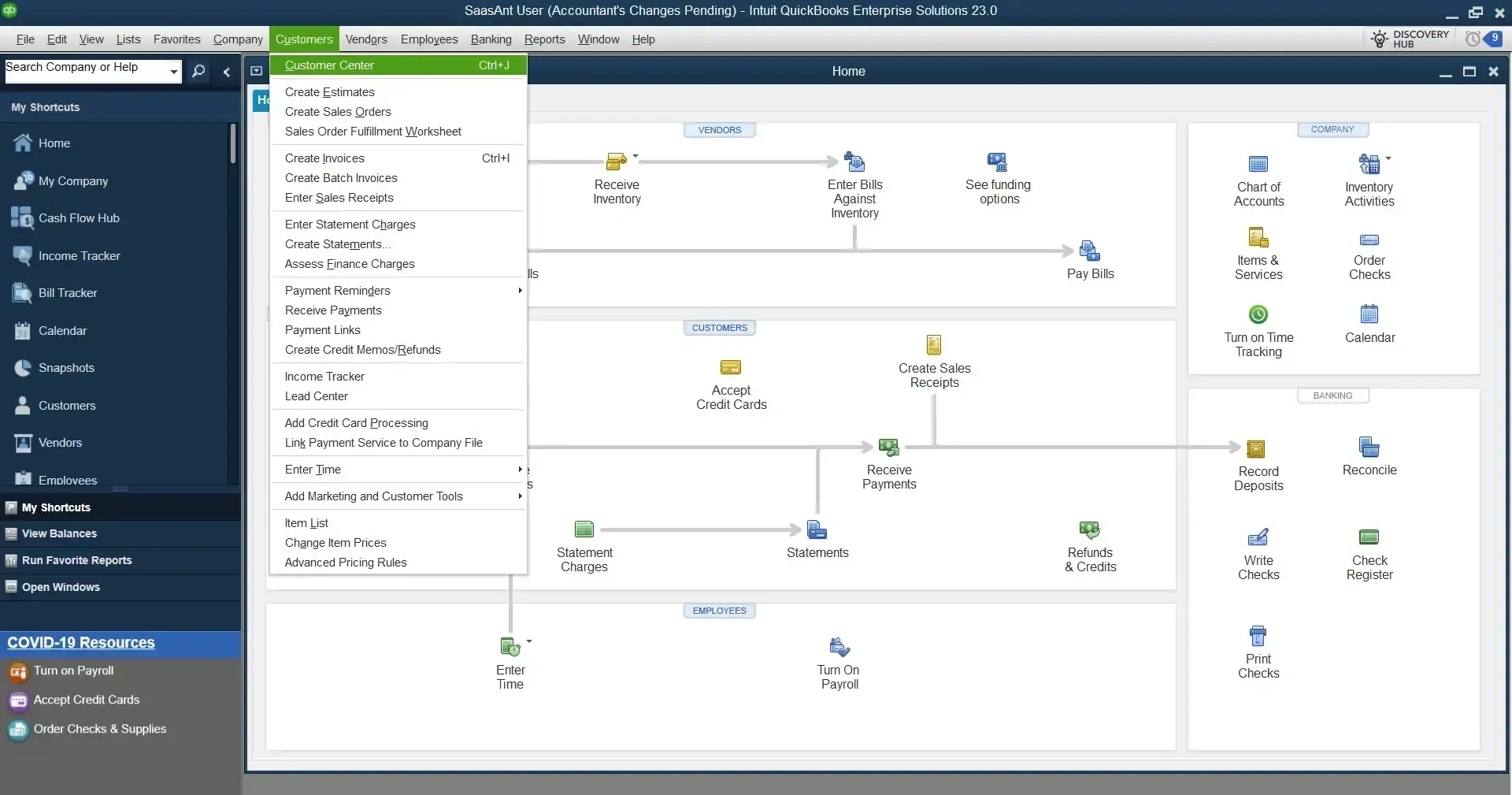
Similarly, establish your customer base via 'Customers' > 'Customer Center.'
Step 6: Document the Manufacturing Process
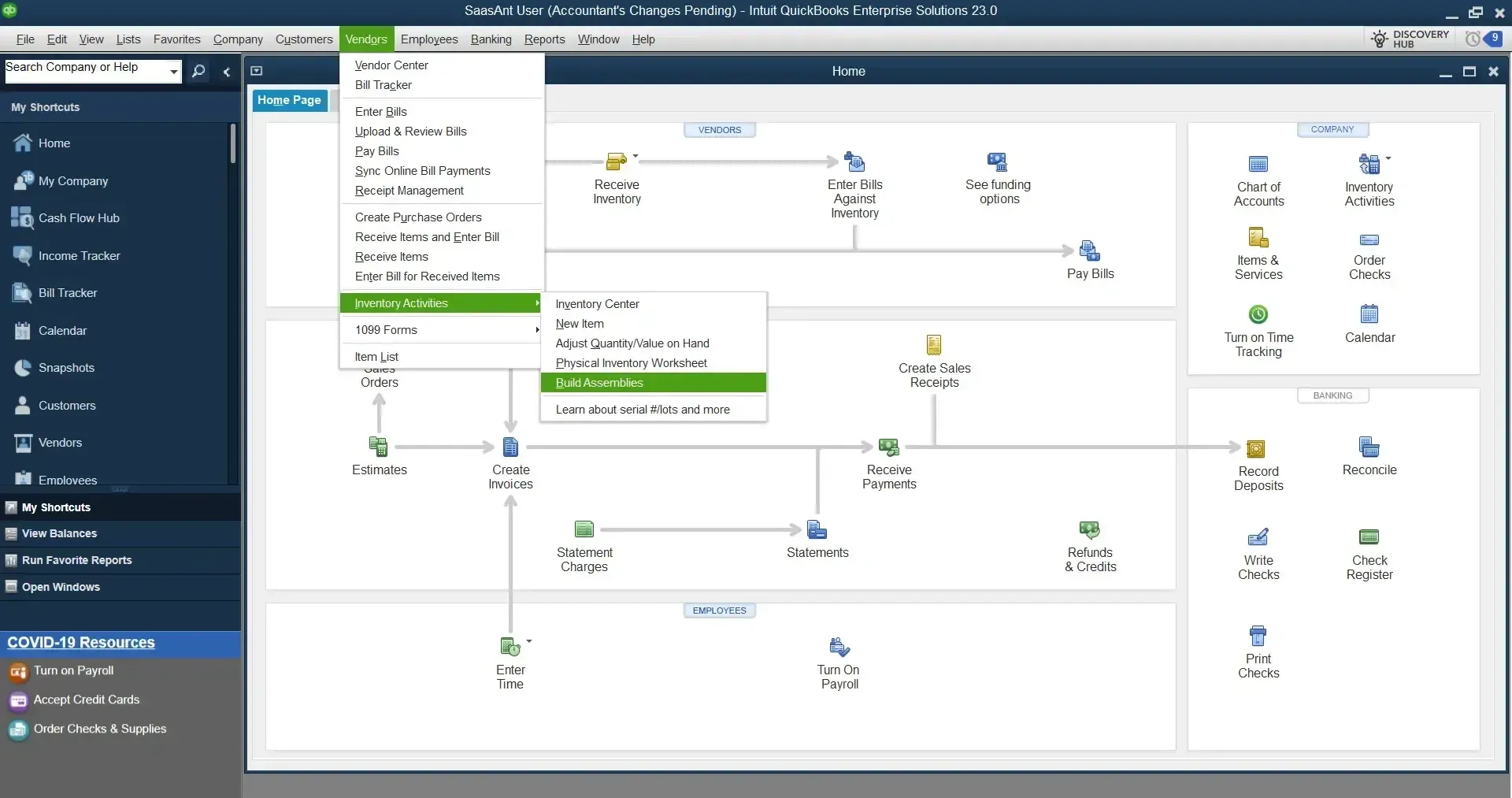
QuickBooks lets you track the manufacturing process using the 'Build Assemblies' function. Go to 'Vendors' > 'Inventory Activities' > 'Build Assemblies' to document the production of assembly items.
Conclusion
QuickBooks Manufacturing is a dynamic tool that can significantly enhance manufacturing operations, ensuring accurate inventory management and cost tracking. Following these steps will help you optimize your business with QuickBooks.
FAQs
Can QuickBooks cater to manufacturing operations?
QuickBooks Desktop Enterprise for Manufacturing and Wholesale is designed to meet manufacturing businesses' unique needs.
How do I set up inventory in QuickBooks Manufacturing?
Setting up inventory involves creating items under 'Lists' > 'Item List.' Each item represents a product or raw material.
What is an assembly item in QuickBooks Manufacturing?
An assembly item in QuickBooks Manufacturing symbolizes a finished product with multiple component items in your inventory.
What is QuickBooks Enterprise for manufacturing?
QuickBooks Enterprise is a robust accounting software designed for medium-to-large businesses. For manufacturing companies, it offers industry-specific features such as:
Advanced Inventory Management: Track raw materials, finished goods, and work-in-progress efficiently.
Bill of Materials (BOM): Create and manage BOMs for assembly items.
Purchase Orders and Vendor Management: Streamline procurement processes.
Sales Orders and Order Fulfillment: Manage customer orders seamlessly.
Inventory Assemblies: Combine components into finished products.
Inventory Valuation Methods: Choose FIFO, LIFO, or average cost methods.
Negative Inventory Handling: Address stock discrepancies.
Custom Pricing Rules: Set pricing based on customer types or volume.
Detailed Reporting: Access sales, inventory, and financial reports tailored to manufacturing needs.
Is QuickBooks Desktop suitable for manufacturing businesses?
Yes, QuickBooks Desktop (including the Enterprise version) caters to manufacturing companies. It provides features like inventory tracking, assembly builds, and cost calculations.
Bill of Materials (BOM): Define components, subassemblies, and finished products.
Work Orders: Plan and execute production tasks.
Inventory Adjustments: Handle scrap, rework, and waste.
Sales Orders and Invoicing: Efficiently manage customer orders and billing.
Advanced Inventory: Optimize stock levels and reorder points.
Custom Fields: Tailor data entry to manufacturing-specific details.
How does QuickBooks handle inventory in manufacturing?
QuickBooks allows you to:
Create Inventory Items: Set up raw materials, finished goods, and subassemblies.
Track Quantities: Monitor stock levels, reorder points, and safety stock.
Use Inventory Assemblies: Build finished products from components.
Record Costs: Assign costs to materials, labor, and overhead.
Manage Units of Measure: Handle different units (e.g., pounds, pieces, gallons).
Calculate Inventory Value: Choose valuation methods (FIFO, LIFO, etc.).
Can QuickBooks Enterprise handle complex manufacturing processes?
Absolutely! QuickBooks Enterprise offers features like Advanced Inventory, Bill of Materials, and Work Orders to streamline complex manufacturing workflows. It suits industries like electronics, machinery, textiles, and more.
For further insights on QuickBooks and other accounting software, check out the SaasAnt Blog. Consider switching from Excel-based accounting to QuickBooks. In that case, SaasAnt can help you migrate your data from Excel to QuickBooks with accuracy and precision without any data loss. Contact migration-support@saasant.com
Need a step-by-step guide? Watch this video